
DoodleMaker Review
Turns plain text into colour doodle videos in 60 languages. The translation is the good part. Most of the rest has aged.
Last updated
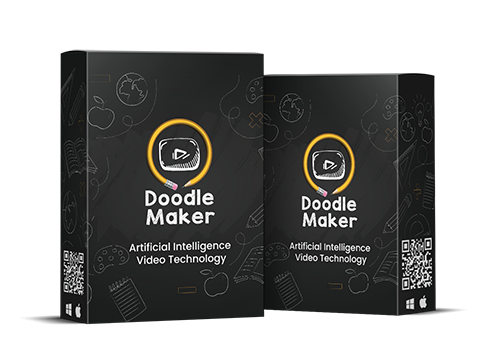
Watch My DoodleMaker Review

What is DoodleMaker?
DoodleMaker turns text into animated doodle videos. You paste a script, pick a template, and it renders a whiteboard-style animation with a synthetic voice-over. It also translates into 60 languages in one click, which is the feature that genuinely sets it apart.
It is a browser app, so nothing to install, and it is sold as a one-time payment with a commercial licence rather than a subscription. That is how it is still being sold six years after launch. The one-time price is the pitch, but a low price is not the same as good value, and that is where I have the most reservations.
Who it's for
DoodleMaker suits people who need explainer videos in volume and do not need them to look modern.
Course & content creators
Doodle animation is still a reasonable fit for teaching, where the hand-drawn look reads as explanatory rather than cheap. Paste a lesson script, get a video, move on to the next one.
Anyone selling into other languages
The one-click translation plus text-to-speech in 60 languages is the real reason to look at this. Producing the same explainer in eight languages is a job that normally costs money per language.
Who should skip it: if you want video that looks current, skip this. The doodle format peaked around 2019 and viewers now read it as a dated marketing style. If you want polished 2D and 3D animation, CreateStudio is the better tool, and if you only care about the voice-over, ElevenLabs will give you far better audio than any text-to-speech bundled in here.
How it works (my hands-on walkthrough)
You paste or type your script, and DoodleMaker splits it into scenes. Each scene gets a doodle asset and a line of narration. You swap assets from the built-in library, adjust timing, choose a voice and language, then render.
Getting a first draft out is quick. Getting it to look the way you want is not. The timeline is fiddly, scene timing needs constant nudging to match the narration, and the interface has the cluttered feel of software built in 2020 and patched since. Nothing here is hard exactly, but you spend more time fighting the editor than the marketing suggests.
The translation engine is the standout. You build once in English, then generate the same video in another language, and it handles both the on-screen text and the voice-over. That is a genuinely useful shortcut, and I have not seen it done this cheaply elsewhere.
The weak point is the audio. The bundled text-to-speech is serviceable but clearly synthetic, with the flat cadence you would expect from a 2020-era engine. For anything customer-facing I would record the voice-over elsewhere and import it. That is the honest caveat on the whole product: the automation is good, the polish is not.
How DoodleMaker Works in 4 Steps
Paste Your Script
Drop in your text and DoodleMaker breaks it into scenes automatically, one line of narration at a time. This is the step that saves the most work.
Pick a Template & Assets
Choose from 300+ ready-made templates, then swap in doodle characters, images and icons from the built-in library of royalty-free assets.
Choose Voice & Language
Pick a text-to-speech voice in any of 60 languages, or import your own recording. One click re-renders the whole video in another language.
Render & Sell It
Export the finished video, up to 6 minutes on the Standard tier or 15 on Enterprise. The commercial licence means you can charge clients for it.
Key Features & My Honest Take
- Text-to-video: paste a script and it builds the scenesThe core feature, and it does save the slowest part of the job. Expect to spend the time you saved putting the timing right afterwards.
- One-click translation into 60 languagesThe best thing in here, and rare at this price. It handles on-screen text and the voice-over together.
- Built-in text-to-speech voicesServiceable but clearly synthetic. Fine for internal or training video, not for a sales page. Record your own or use a modern AI voice tool instead.
- 300+ ready-made templatesEnough to never start from blank, though you will start recognising them. They also look their age.
- Colour and black-and-white doodle stylesColour helps a lot. The plain whiteboard look is what dates the format most.
- 5 million royalty-free images plus a music libraryIncluded rather than a bonus, despite how it is sometimes marketed. Useful, and it saves a stock subscription.
- AI photo background remover and photo-to-sketch converterBoth work, both are minor. Do not buy for these.
- Unlimited video renders and a commercial licence on both tiersThe best part of the deal on paper. The catch is whether the output is good enough to charge for, and for most clients in 2026 it is not.
Pros
- One-click translation into 60 languages is rare at any price, let alone this one
- Script-to-video automation removes the slowest part of making an explainer
- One-time price rather than another monthly subscription
- Browser-based, so nothing to install and it runs on any machine
- Unlimited renders on both tiers, with no per-video credit system
- 30-day no-questions-asked refund, straight from the vendor's own FAQ
Cons
- The doodle format is dated. It peaked around 2019 and viewers now read it as an older marketing style
- Quick to a first draft, slow to a finished one. The timeline is fiddly and scene timing needs constant nudging to match the narration
- The interface has not kept up. It feels like 2020 software that has been patched rather than rebuilt
- The bundled text-to-speech is noticeably synthetic. Plan to import your own voice-over for anything customer-facing
- The $47 tier caps you at 720p and 6-minute videos, which is thin in 2026. 1080p means paying for Enterprise
- Cheap is not the same as good value. Free and low-cost tools now cover a lot of this, so the money only makes sense if you specifically want doodle animation
- Templates and doodle assets look their age, and there is no way to modernise the core style
- The 'launch discount' framing has been running for years, so treat the urgency on the sales page as permanent furniture
Pricing & Upsells
DoodleMaker is sold as a one-time payment in two tiers, both with a 30-day money-back guarantee and a commercial licence. The coupon DM20OFF takes $20 off. The practical difference is resolution and video length, so pick on that.
- Unlimited videos and unlimited renders
- AI video maker plus 300+ templates
- AI translation engine, 60 languages
- Colour and black-and-white doodles
- 5 million royalty-free images and a music library
- 720p video, up to 6 minutes long
- Commercial licence and step-by-step training
- Good enough if your videos are short. The 6-minute cap is the thing most likely to bite
- Everything in Standard
- 1080p HD video instead of 720p
- Up to 15 minutes per video instead of 6
- Client-getting training included
- $22 more for 1080p and 15 minutes. If you plan to sell these videos, this is the one to take
Which tier to get: if you buy at all, buy Enterprise. The $22 gap covers 1080p and 15-minute videos, and handing a client a 720p video in 2026 is not something you want to explain. Standard only makes sense if your videos will be short and internal. Use DM20OFF either way. The bigger question is whether to buy at all: this is cheap, not good value, and it is only worth the money if you specifically want doodle animation rather than video in general.
My Verdict for DoodleMaker
Free Bonuses When You Get DoodleMaker Here
Buy DoodleMaker through my link and you'll automatically get these free bonuses on your receipt.




FAQ
Is DoodleMaker worth it?
Only in a narrow case. If you specifically want doodle animation and you sell into more than one language, the translation engine makes it worth the $47 to $69. Outside that, no. The price is low but the output looks dated, the editor is more work than the marketing suggests, and there are better tools for the same money if you want video in general rather than doodle video in particular.
Is the doodle video style still effective?
Less than it was. The format peaked around 2019 and audiences have seen a lot of it since. It still works for teaching and explainer content, where the hand-drawn look reads as instructional. For sales video it now dates you.
How good are the built-in voices?
Serviceable, and clearly synthetic. The engine is 2020-era, so the cadence is flat next to what modern AI voice tools produce. Fine for internal or training video. For anything customer-facing, record your own or import audio from a better tool.
Do I need to install anything?
No. It runs in your browser, so it works the same on Windows or Mac and there is nothing to download.
What is the difference between the two tiers?
Resolution and length. Standard at $47 gives you 720p and up to 6 minutes. Enterprise at $69 gives you 1080p, up to 15 minutes, and the client-getting training. If you plan to sell the videos, take Enterprise.
Can I sell the videos I make?
Yes. Both tiers include a commercial licence and unlimited renders, so you can charge clients for the videos you produce.
Is there a refund policy?
Yes, 30 days. The vendor's own FAQ says to email support@doodlemaker.com for a no-questions-asked refund.

Jonas Nielsen
Marketing software reviewer
I've tested 100+ marketing tools hands-on and publish full demos and honest verdicts on YouTube, where 4,800+ people follow along. I only recommend software I've actually logged into and used myself.

